|
|
|


|
Site Index:
Cube Section:
|
Cube Sheet SoftwareWinfield's Electronic Cube Sheet System
FYI ALL Winfield's (400 based) Custom Tariff's integrate with our Cube Sheet Software. Video Demo of Winfield's CubeSheet
"Screen Shots"
- pdf view of our CubeSheet
PRINTOUT options - pdf format
PRICING options
Order a Free CubeSheet Demo
CD
Contact Winfield Micro
Winfield
Standard Sales Flyer - pdf
Video Demo of Winfield's CubeSheet
"Screen Shots"
- pdf view of our CubeSheet
PRINTOUT options - pdf format
PRICING options
Order a Free CubeSheet Demo
CD
Contact Winfield Micro
Winfield
Standard Sales Flyer - pdf
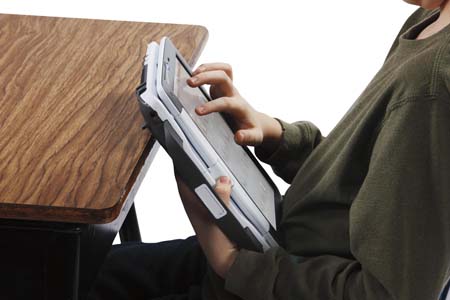
CubeSheet Printouts - pdf formatPlease notice: The Handheld computer will allow the Sales Person and Shipper to sign the CubeSheet (in any color ink) and save for recall at a later time. Any cube sheet can be saved in pdf format for easy email attachment. Also notice the handwritten notes may be written to your shipper (in any color ink) directly on the CubeSheet. Also, you may highlight any text on the CubeSheet. 1. 8.5 x 14 - Featuring: All Name & Address options. 2. 8.5 x 11 - Featuring: 3 columns & moving items only. 3. 8.5 x 11 - Featuring: 2 columns & NOT moving items only. 4. 8.5 x 11 - Featuring: 3 columns & Mvg + Not Mvg items. 5. 8.5 x 11 - Featuring: 2 columns & Itemized Packing list. 6. 8.5 x 11 - Featuring: 3 columns & Weight additive items.
CubeSheet Software Pricing
Winfield Micro Sells the CubeSheet software separately from the hardware system the you choose. Winfield will provide you with all of the tools and information to purchase your hardware directly from any vendor listed on our hardware page. This CubeSheet Software is written specifically for the HandHeld Mobile Tablet PC system using Windows XP or Vista.
CubeSheet Software: $250.00.
"Screen Shots" of our CubeSheetBelow are links to "screen shots" featuring general instructions by program category. Utility functions1. Add/Edit/Remove ROOM NAMES (Master Database). 2. Add/Edit/Remove CATEGORY NAMES (Master DB). 3. Add/Edit/Remove CUBE ITEMS (Master Database). 4. Add/Edit/Remove SALES NAMES (Master Database). 5. Archive CubeSheets (move active shipment to inactive). 6. UnArchive CubeSheets (restore inactive shipment). 7. Master DataBase Restore (Start Over Fresh).Load / Save / New Shipments Functions1. Open Screen (previously saved to Database). 2. Save Screen (save to Database for recall later). 3. New Screen (start a new cubesheet).Name & Address Functions1. Add/Edit Names/Address/Agency info to CubeSheet.Printing Functions1. Printing - to Printer/Screen/pdf files.General Cube Sheet Functions1. General layout and standard functions. 2. Edit Function for any Item. 3. Special functions for the "Cube Sheet".
Contact Winfield MicroWinfield Micro Systems, Inc 2333 Wisconsin Ave. Downers Grove, IL 60515 Phone: 630-960-5515 Fax: 630-960-5592 Contact: Jack Sorenson Website: www.WinfieldMicro.com Email: sales@WinfieldMicro.comEmail us and ask for our FREE CubeSheet Demo CD
|
|
Winfield Micro Systems, Inc © 1979 |
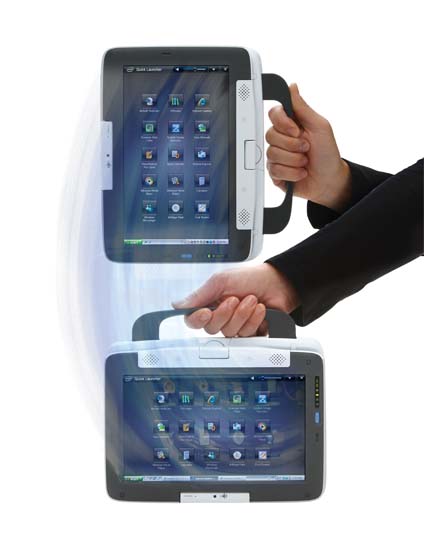 This new "Cube Sheet" estimator system is a
complete stand-alone system developed specifically for the Handheld (touch screen)
platform. Complete with full printing capabilities, Winfield's "Cube
Sheet" is a powerful estimating tool. Using the 8.9" screen, our
software will display in 1024 x 600 mode in both
landscape and portrait. This computer (above) is not your typical Handheld computer, it is a fully functional computer featuring Windows XP
with wireless internet, network, blue tooth, touch screen and much more.
This new "Cube Sheet" estimator system is a
complete stand-alone system developed specifically for the Handheld (touch screen)
platform. Complete with full printing capabilities, Winfield's "Cube
Sheet" is a powerful estimating tool. Using the 8.9" screen, our
software will display in 1024 x 600 mode in both
landscape and portrait. This computer (above) is not your typical Handheld computer, it is a fully functional computer featuring Windows XP
with wireless internet, network, blue tooth, touch screen and much more.